For salons, barbers and beauty studios
Every call books a chair.
Callra answers while you're mid-cut. It books, moves and cancels appointments in your diary, stylist by stylist, and texts the client a confirmation before they've hung up.
From $70 a month. Free to sign up and set up.
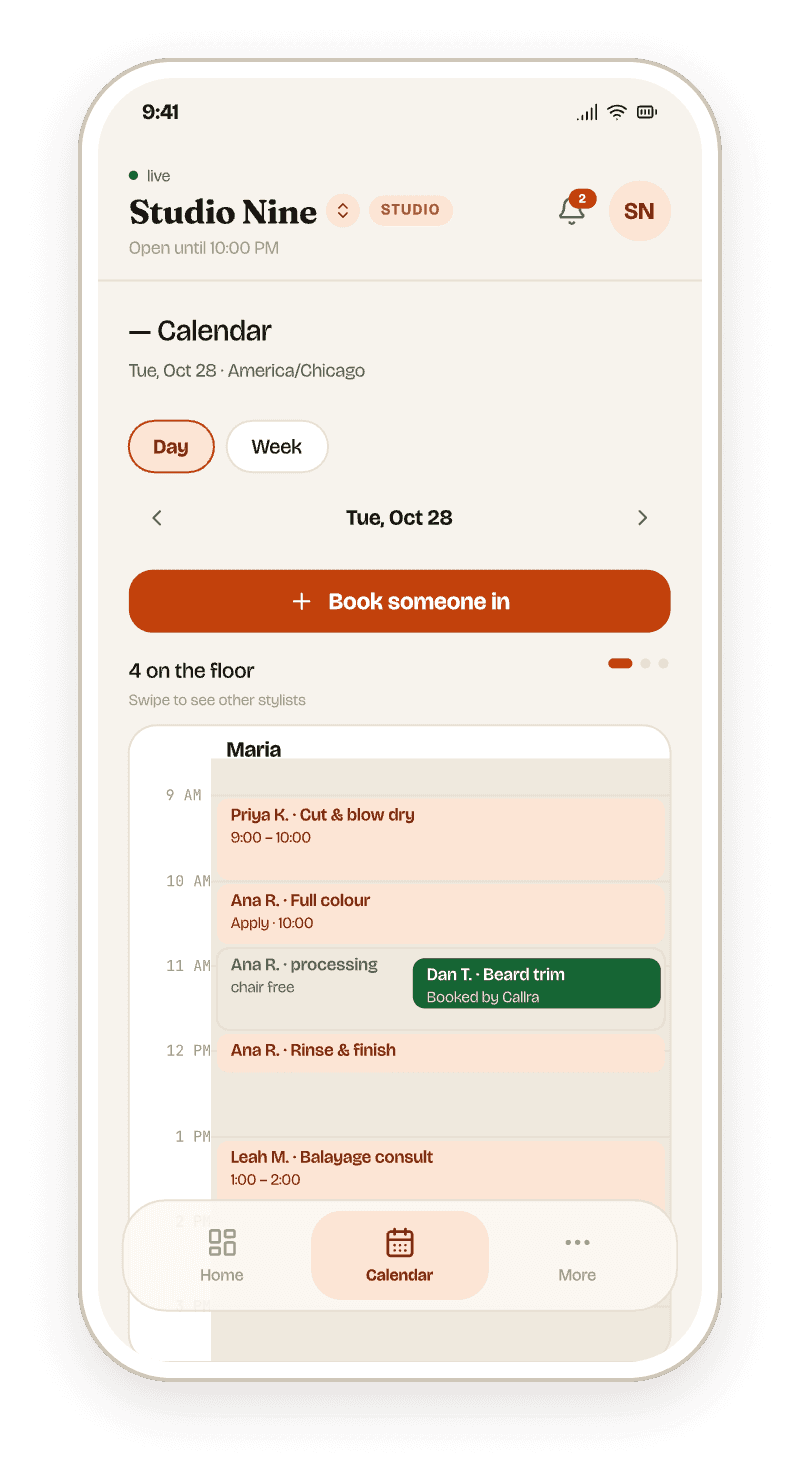
— One call, start to finish
From ring to diary in 58 seconds.
A client moving her colour to Saturday, on a busy Thursday. Nobody put the scissors down.
- 0:00Rings onceCallra answers with your salon's name, in the client's language.
- 0:08Finds the bookingIt recognises the client's number and finds Thursday's colour with Ana.
- 0:21Checks the rulesA colour needs a patch test on file. Hers is, so it carries on.
- 0:44Offers real timesOnly slots where Ana is in and the full service fits.
- 0:58Moved and textedThe diary updates, and the client gets one confirmation text.
— Everything a good front desk does
It knows your stylists, your services and your rules.
- Books, moves, cancelsStraight into your diary, against each stylist's hours, time off and the services they do.
- Fills colour gapsSwitch it on and a trim slots into the time a colour is processing. Off until you say so.
- Patch tests firstIf a colour needs a test and the client has none on file, it won't book the colour.
- Two texts, not tenA confirmation, then one reminder before the visit. Never during quiet hours.
- Stylists see their dayEach stylist gets their own diary in the app. The front desk sees everyone's.
- A person when they want oneAsk for the salon and it transfers the call to your number.
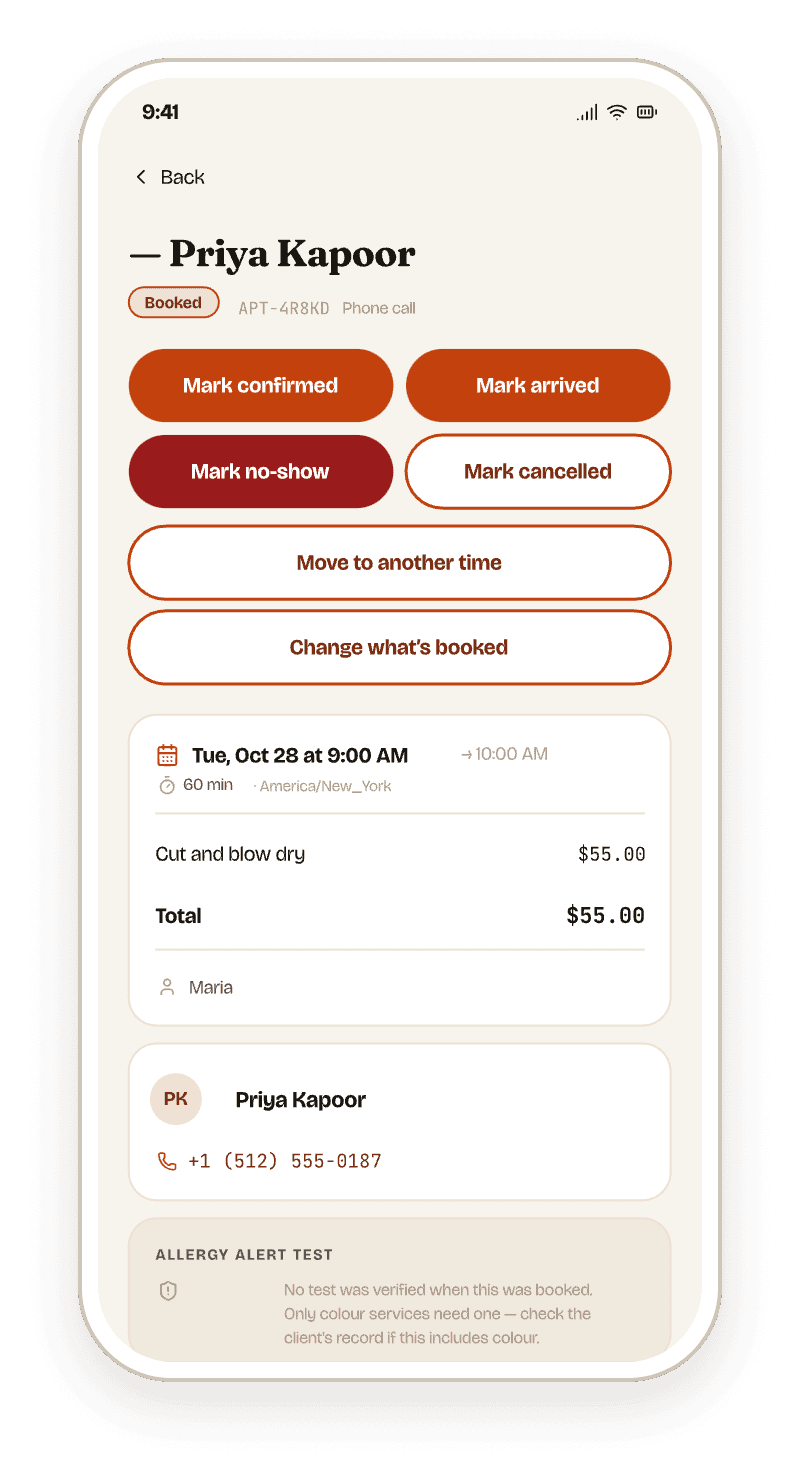
— The salon, in your pocket
Book, move and check in clients without leaving the chair.
- Every booking, wherever it came fromPhone, your booking page or you, all in one diary on iPhone and Android.
- Mark arrived, no-show or doneOne tap from the appointment, and the client record keeps the history.
- Hours, time off and services per stylistSet once, and the agent never offers a slot that breaks them.
- You choose when the reminder goesSet how long before the visit it's sent. Texts never go out in quiet hours.
— From the Studio plan
A booking page that follows the same rules.
Clients who'd rather tap than call can book themselves on the web, into the same diary, with the same stylists, gaps and patch-test rules the phone agent uses.
— Pricing
Three plans. Every feature listed.
Billed monthly, cancel any time. Every plan includes your own phone number and every language.
- Chair$70/mo250 min of calls includedA solo stylist, or a salon whose phone is quiet.Create your account
- Studio$130/mo500 min of calls includedTwo to four chairs, a steady phone. Adds the booking page.Create your account
- Suite$190/mo800 min of calls includedA busy salon, or two sites on one line.Create your account
The questions salon owners actually ask.
How the booking works, what it will and will not do, and where your diary stays in charge.
Yes. This is gap-aware booking. A colour is modelled as apply, process and finish, and because the stylist is free through the processing stretch, Callra can book a cut into it. You turn it on per salon and off per service, so anything that should hold the chair end to end still does.
As a gate, not a warning. A colour service you flag as needing a test can only be booked by a client with a valid one on file: 48 hours ahead and good for 180 days by default, both adjustable per service. Without one the slot is never offered, and records are append-only so the history survives for your insurer.
Yes. Callra looks up the existing appointment and cancels or reschedules it inside the same call, without handing the caller to a person. It also recognises returning clients and can rebook their usual service with their usual stylist.
Yes, and every part of it is yours to set: whether messages send at all, how far ahead the reminder lands, anywhere from an hour to a fortnight, and what it includes: stylist, service, price, address, plus any line of your own. Quiet hours are on by default, so a message that would land at 3am is held rather than dropped.
Yes. When a caller asks for a person you choose where that goes: a phone number, or the Callra app itself. Through the app it rings your iPhone on the normal system call screen, and you can minimise the call to book that client in while you are still talking to them.
No, and that is deliberate. The diary, appointments, services, stylists, client book, reminders, reports and settings are all in the app, because salons are not run from a desk. The one thing on the open web is your clients’ booking page.
No. Callra keeps its own diary rather than syncing with another system, so the chair runs in Callra or it does not run in Callra. There is no Google Calendar sync and no import from an existing booking tool today. That is worth knowing before you sign up rather than after: if the book you have is working and you only want a voice answering the phone beside it, Callra is not the shape of that. If the phone is the thing that is broken, the diary comes with it.
Yes, from the Studio plan up. Clients browse your services and book themselves, with no account and no payment, on the same availability engine as the phone agent, so it obeys the same hours, buffers, time off and allergy-test rules, and the booking lands in your diary either way.
It reduces them with the reminder you configure, and it measures them: your report separates revenue booked from revenue completed from revenue lost to no-shows, alongside your no-show rate, average ticket and rebooking rate. Callra does not take deposits or charge cancellation fees.
Yes. One chair is a first-class setup, not a cut-down version of a bigger one. Callra will not ask a caller which stylist they would like when there is only one answer; it names you once and moves straight to times.
English, Spanish, French, German, Italian, Portuguese, Dutch, Hindi, Japanese, Russian, Arabic and Norwegian among others. It can run a bilingual line, pairing English with one other, that switches between the two mid-conversation as the caller does.
Let the
Saturday rush
ring.
Create your account and set it up in the app, free. It starts answering your phone the moment you pick a plan.
Three steps, no card to start
- 1Sign upWith your email or your Google account.
- 2Tell it about your businessYour menu, or your services and team, your hours and its voice.
- 3Pick a planIt starts answering. Until then, nothing is charged.
Already have an account? Sign in